
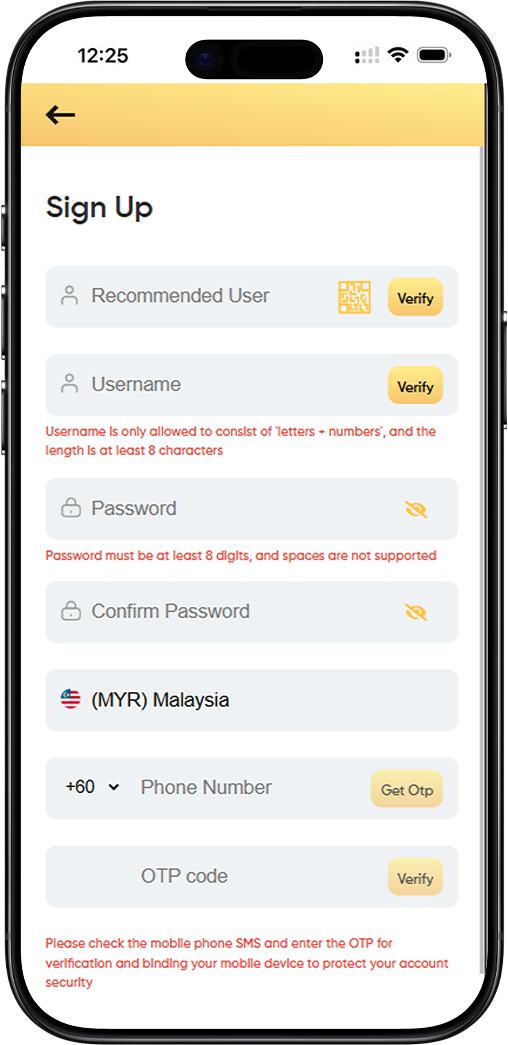
Registering for LUCKYTOWNPLUS is designed to be fast, secure, and user-friendly. Whether you're new to the platform or an existing LUCKYTOWNPLUS member, this guide will walk you through each step. We focus on clarity and transparency-so you understand not just how to register, but why each field is important for your account's protection.
Complete Walkthrough of Each Registration Field
The LUCKYTOWNPLUS Field - What Is It For?
You may notice a field labeled "LUCKYTOWNPLUS" at the top of the registration form. This is an optional field used for promotional codes or special access passes. If you don't have a code, simply leave it blank. These codes are sometimes shared by the LUCKYTOWNPLUS team during events or partner promotions.
Username Creation - Rules and Verification Process
Your username is your identity in the LUCKYTOWNPLUS community. It must contain only letters (a-z, A-Z) and numbers (0-9). Special characters are not allowed. To ensure uniqueness and security, your username must be at least 8 characters long.
How Username Verification Works
Once you enter your desired username, click the "Verify" button. This checks whether the name is already in use. If it's taken, the system will suggest available alternatives that follow the same format. This step ensures every LUCKYTOWNPLUS member has a unique identity.
Password Requirements - Building Strong Security
Your password must be at least 8 characters long and cannot contain spaces. While these are the minimum requirements, we recommend using a mix of uppercase, lowercase, numbers, and symbols to strengthen your account security.
Why Password Confirmation Matters
The "Password" and "Confirm Password" fields help catch typos. The system checks both entries in real time and alerts you if they don't match. This extra step helps prevent login issues later.
Malaysia Phone Number Verification with OTP
LUCKYTOWNPLUS requires phone verification for all Malaysia-based users. Select "(MYR) Malaysia" from the country code menu, then enter your full mobile number starting with +60. This links your account to a verified mobile device.
The OTP Process Explained
After entering your number, click "Get OTP". You'll receive a one-time passcode via SMS within 30-60 seconds. Enter the code in the OTP field and click "Verify" to complete the binding process. This ensures only you can access your account.
Step-by-Step Guide to Completing Your Registration
Step 1: Prepare Your Information
Before starting your LUCKYTOWNPLUS registration, gather your preferred username (letters + numbers, min. 8 characters), a strong password, and your active Malaysia mobile number. This helps you complete the form quickly.
Step 2: Complete the Username Section
Enter your chosen username, double-check it meets the format rules, and click "Verify". Wait for confirmation that it's available before moving to the next step.
What to Do If Username Is Taken
If your username is unavailable, try adding numbers or using a variation. The system may suggest alternatives, but you can also get creative-just remember to follow the letter+number rule.
Step 3: Create and Confirm Your Password
Enter your password in the first field, then re-enter it in the "Confirm Password" field. Make sure both match exactly. Avoid using spaces, and aim for a strong mix of characters.
Step 4: Complete Phone Verification
Select "(MYR) Malaysia" from the dropdown, enter your full +60 number, and click "Get OTP". Input the code you receive via SMS and click "Verify".
Troubleshooting OTP Delivery
If you don't receive the OTP within 60 seconds, double-check your number and ensure your phone has signal. You can request a new code after 60 seconds. The system allows up to three attempts for security.
Step 5: Final Submission
Once all fields are verified, review your information and click "Submit". You'll be redirected to your new LUCKYTOWNPLUS dashboard or a welcome page confirming your registration.
Frequently Asked Questions About LUCKYTOWNPLUS Registration
Can I Change My Username After Registration?
Usernames on LUCKYTOWNPLUS are permanent. Choose carefully. If you absolutely need a change, contact LUCKYTOWNPLUS support-but changes are not guaranteed.
Is My Personal Information Secure During Registration?
Yes. LUCKYTOWNPLUS uses industry-standard encryption. Your password is hashed, and your phone number is used only for verification and security. We never share your data without consent.
LUCKYTOWNPLUS Privacy Commitment
We believe in transparency. Our privacy policy outlines exactly how your data is handled. Your trust is essential to the LUCKYTOWNPLUS community.
What Happens After I Click Submit?
Your account is created instantly. You'll receive a welcome message via email or SMS. You can then log in and start exploring LUCKYTOWNPLUS features.
Why Phone Verification Matters for Your Security
Phone verification adds a critical layer of protection. It confirms you're human, provides a recovery channel, and enables future two-factor authentication. It's one of the most effective ways to keep your LUCKYTOWNPLUS account safe.
Building a Safer Community Together
Every verified account helps build a stronger, safer LUCKYTOWNPLUS community. This simple step keeps bad actors out and ensures a better experience for everyone.
Tips for a Smooth Registration Experience
Before You Begin
Use a stable internet connection and keep your phone nearby. Write down your username and password in a secure place. Consider using a password manager for extra safety.
Common Pitfalls to Avoid
Complete your registration in one session-partial entries are not saved. Double-check your username format, password rules, and phone number prefix (+60).
Getting Help When You Need It
If you run into issues, the LUCKYTOWNPLUS support team is ready to help. Common problems include mistyped numbers, unavailable usernames, or weak passwords. Review the field rules before reaching out.
Quick Access via QR Code

Scan to Register Instantly
Use your mobile device to scan the QR code below. It will take you directly to the LUCKYTOWNPLUS registration page-no manual typing required.
QR Code Instructions
Open your camera or QR scanner, point it at the code, and tap the notification. You'll be taken to the secure registration page where you can complete your sign-up in minutes.
Why Use the QR Code?
Scanning the QR code ensures you're visiting the official LUCKYTOWNPLUS registration URL. It's fast, accurate, and ideal for mobile users.
Start Your LUCKYTOWNPLUS Journey Today
Join a growing community of secure, verified users on LUCKYTOWNPLUS. Registration takes just a few minutes-and once you're in, you'll have full access to everything LUCKYTOWNPLUS has to offer.
Create Your LUCKYTOWNPLUS Account Now