

Adding a bank account to your LUCKYTOWNPLUS profile is essential for secure withdrawals. This process connects your personal bank account to your LUCKYTOWNPLUS account, allowing you to receive funds safely and quickly. Follow our step-by-step guide to complete your bank account setup on LUCKYTOWNPLUS.
Step-by-Step Guide to Add Bank Account on LUCKYTOWNPLUS


Step 1: Access the "Me" Section on LUCKYTOWNPLUS
Log in to your LUCKYTOWNPLUS account and tap the "Me" icon located at the bottom right corner of the app. This section contains all your account management options, including bank account settings.
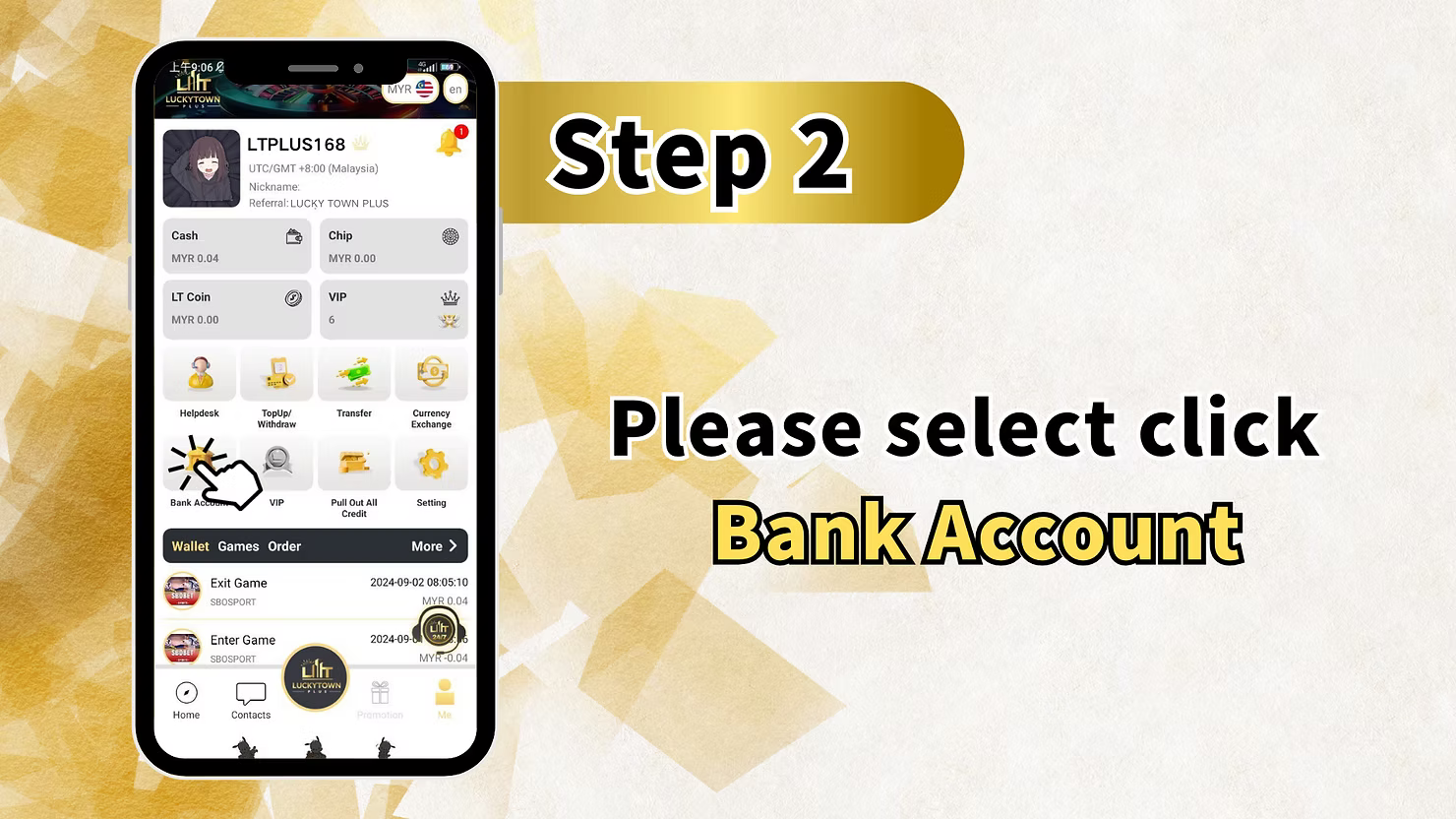
Step 2: Select "Bank Account" on LUCKYTOWNPLUS
From the "Me" section, locate and tap "Bank Account." This page shows your current linked accounts and gives you the option to add a new withdrawal bank account on LUCKYTOWNPLUS.
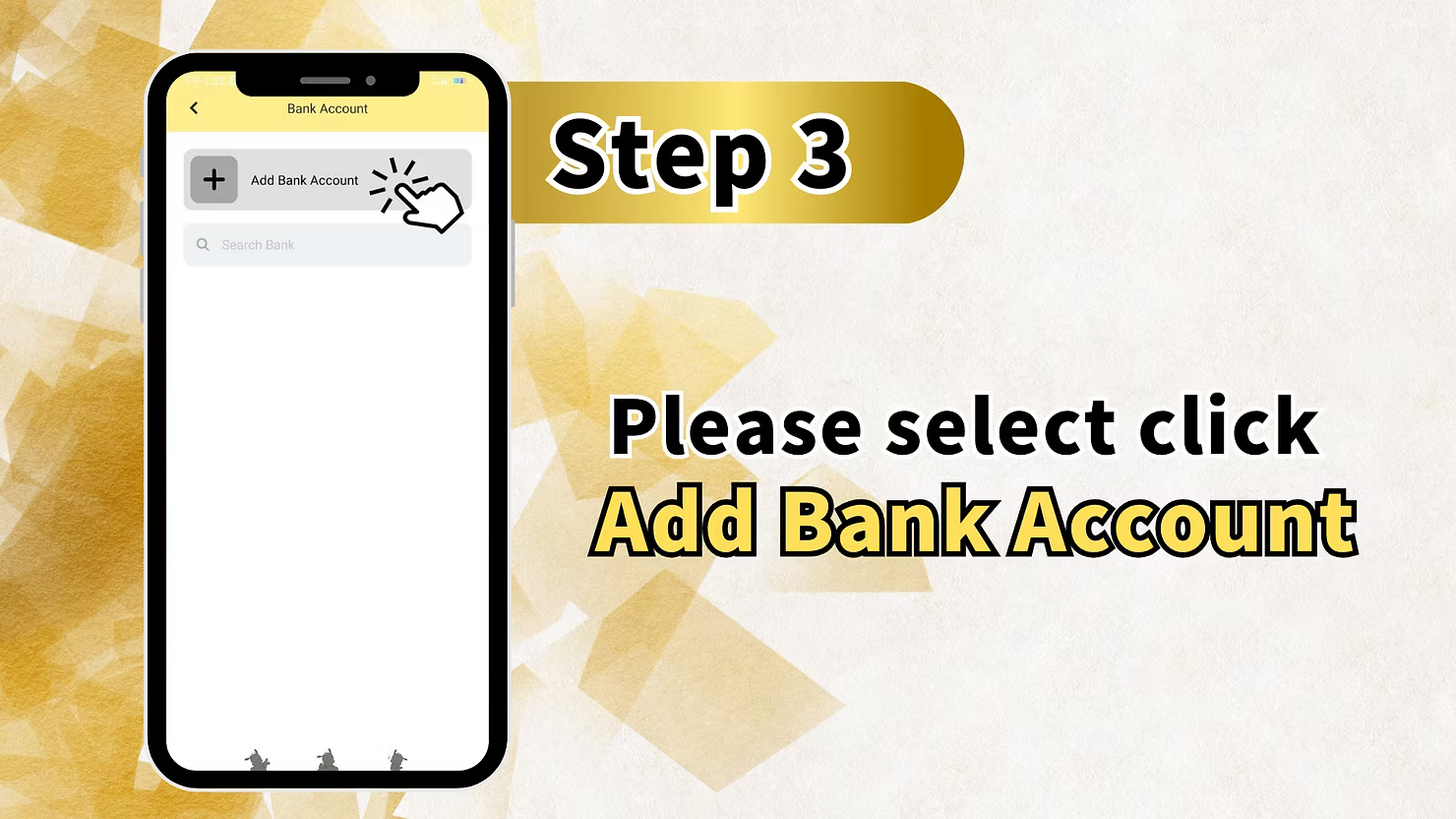
Step 3: Click "Add Bank Account" on LUCKYTOWNPLUS
Tap the "Add Bank Account" button to begin linking your personal bank account to your LUCKYTOWNPLUS profile.
Search Bank Option for LUCKYTOWNPLUS Members
If the bank list is long, use the search bank option to quickly locate your preferred Malaysian bank on LUCKYTOWNPLUS.
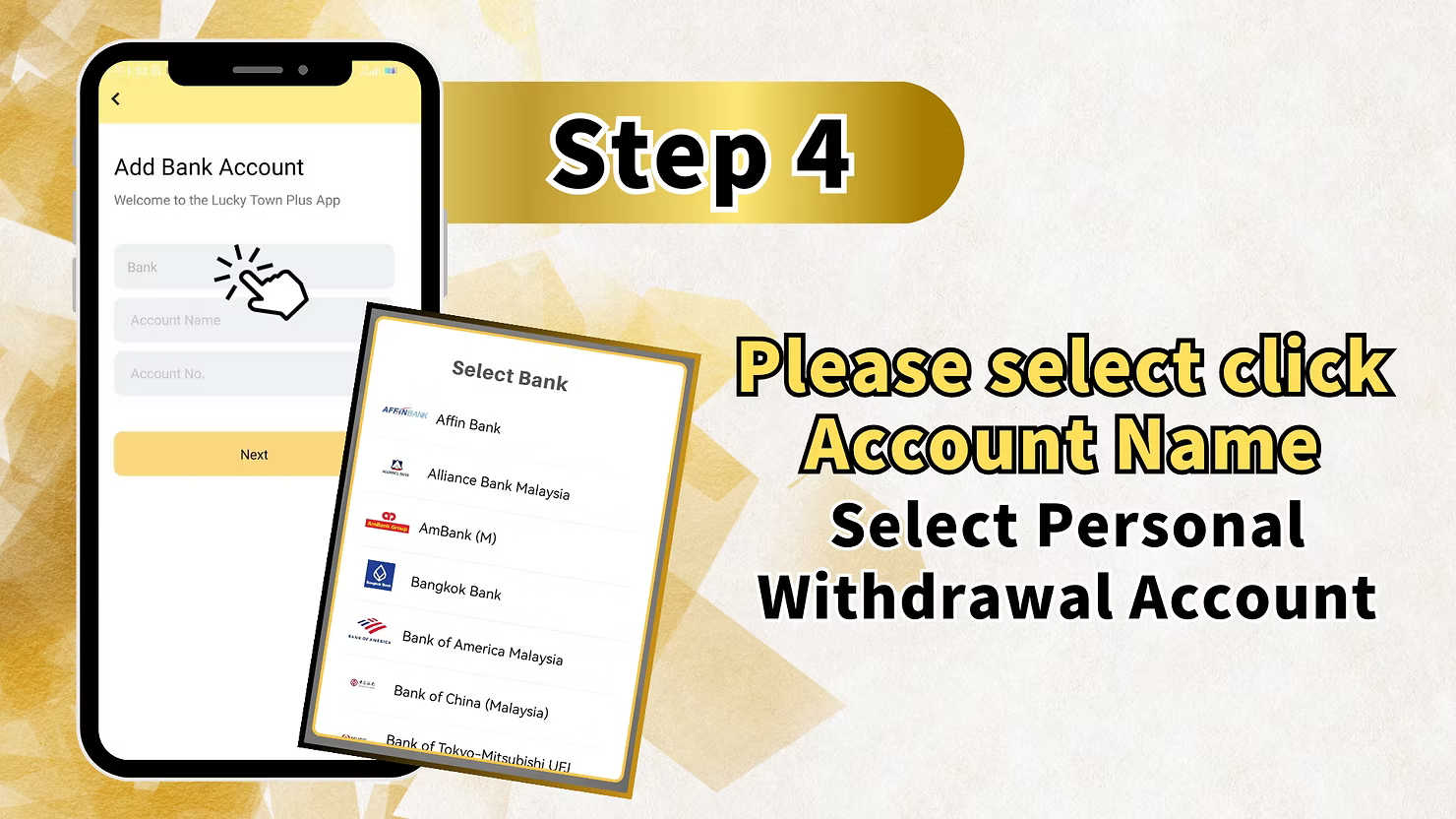
Step 4: Fill in Bank Account Details on LUCKYTOWNPLUS
Enter the required bank account information carefully. Accurate details help avoid withdrawal delays and ensure your funds are sent to the correct account.
Welcome Message for LUCKYTOWNPLUS Members
The top of the form displays a welcome message: "Welcome to the LUCKYTOWNPLUS App." This confirms you are on the correct LUCKYTOWNPLUS bank account setup screen.
Select Bank on LUCKYTOWNPLUS
Click on the "Bank" field and choose your bank from the available list. LUCKYTOWNPLUS supports many Malaysian financial institutions, including:
- Affin Bank on LUCKYTOWNPLUS
- Alliance Bank Malaysia on LUCKYTOWNPLUS
- AmBank (M) on LUCKYTOWNPLUS
- Bangkok Bank on LUCKYTOWNPLUS
- Bank of America Malaysia on LUCKYTOWNPLUS
- Bank of China (Malaysia) on LUCKYTOWNPLUS
- Bank of Tokyo-Mitsubishi UFJ on LUCKYTOWNPLUS
- And many other Malaysian financial institutions on LUCKYTOWNPLUS
Enter Account Name on LUCKYTOWNPLUS
Enter your account name exactly as it appears on your bank account. This name should match your verified LUCKYTOWNPLUS profile name to prevent withdrawal issues.
Enter Account Number on LUCKYTOWNPLUS
Type your bank account number carefully. Double-check each digit before moving forward because incorrect account numbers may cause failed or delayed withdrawals.
Select Personal Withdrawal Account on LUCKYTOWNPLUS
Make sure the account you add is your own personal withdrawal account. LUCKYTOWNPLUS requires withdrawals to be processed according to the verified member name for security and fraud prevention.
Complete Step 4 on LUCKYTOWNPLUS
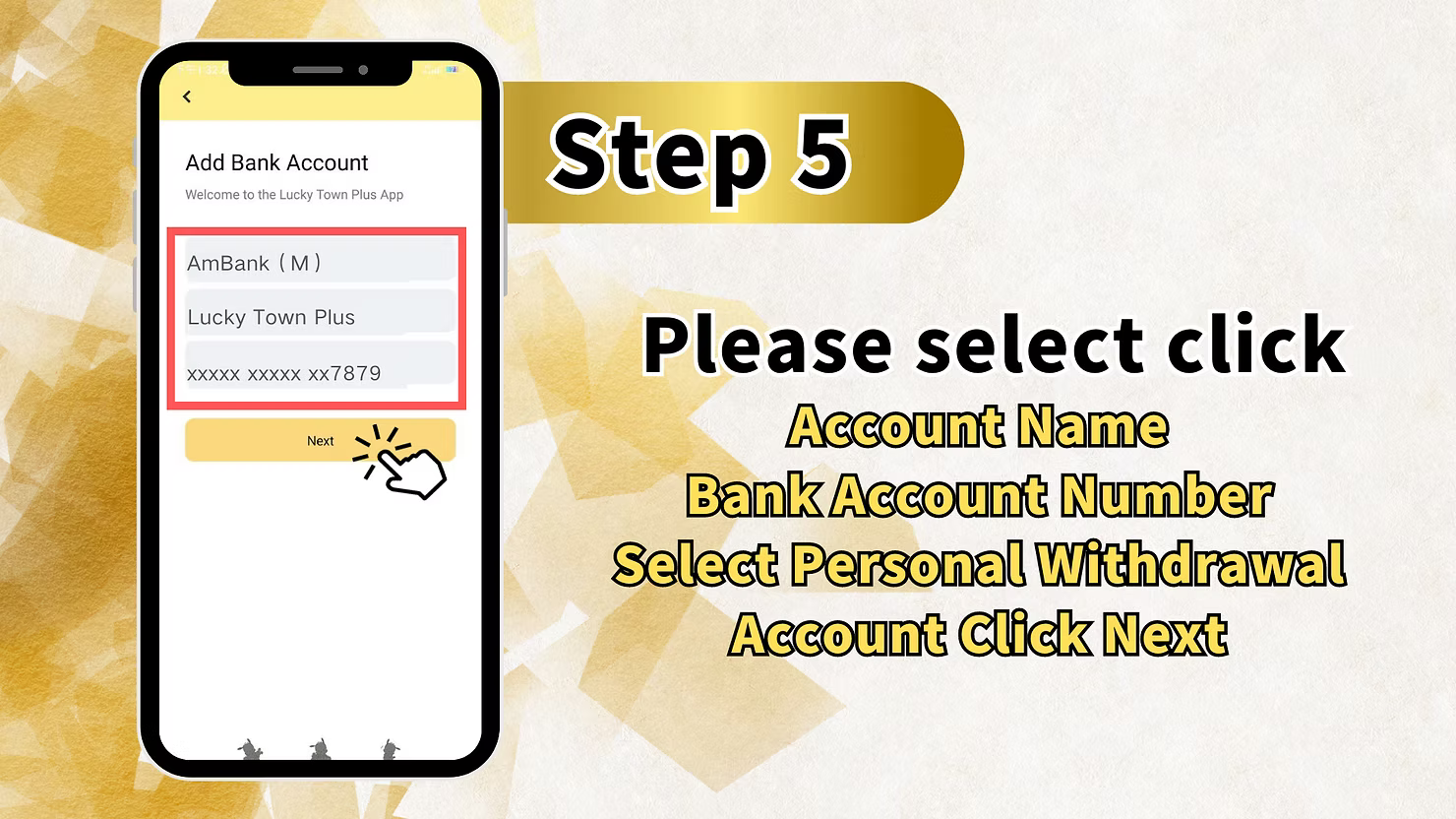
After selecting your bank and entering your account name and account number, review the information and tap "Next" to continue.
Step 5: Review and Confirm Account Details on LUCKYTOWNPLUS
LUCKYTOWNPLUS will show a summary of the bank account details you entered. Review everything carefully before confirming.
Account Summary Display on LUCKYTOWNPLUS
The summary screen may show details such as:
- Bank Name on LUCKYTOWNPLUS: (e.g., AmBank (M))
- Account Name on LUCKYTOWNPLUS: (e.g., LUCKYTOWNPLUS Member)
- Account Number on LUCKYTOWNPLUS: (masked format, e.g., xxxxxxxxxxxxxx7879)
Final Check on LUCKYTOWNPLUS
Confirm that your bank name, account name, and account number are correct. Once confirmed, proceed to the transaction PIN verification step.
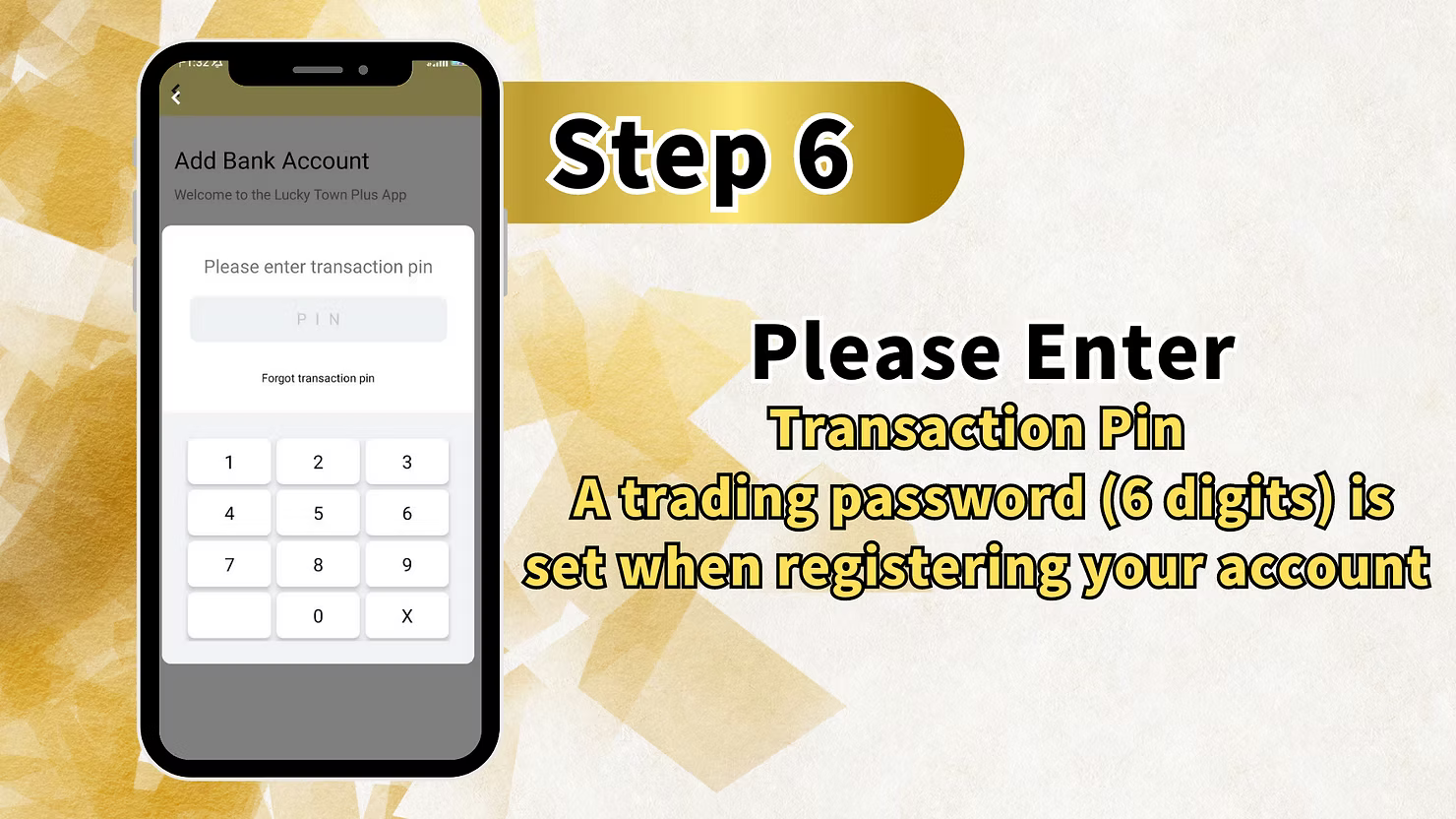
Step 6: Enter Transaction PIN on LUCKYTOWNPLUS
To complete the bank account addition, enter your transaction PIN. This security step confirms that you are authorizing the new bank account on LUCKYTOWNPLUS.
Transaction PIN Requirements on LUCKYTOWNPLUS
Your transaction PIN is required for sensitive account actions, including adding a bank account and approving withdrawals. Keep it private and never share it with anyone.
PIN Entry Screen on LUCKYTOWNPLUS
The PIN screen includes:
- PIN on LUCKYTOWNPLUS: Field where your entered digits appear (masked)
- Forgot transaction pin on LUCKYTOWNPLUS - Link to click if you've forgotten your PIN
- Numeric keypad on LUCKYTOWNPLUS with digits 0-9 and an X for corrections
Complete Step 6 on LUCKYTOWNPLUS
Enter the correct transaction PIN to submit your bank account details and finish the setup process.
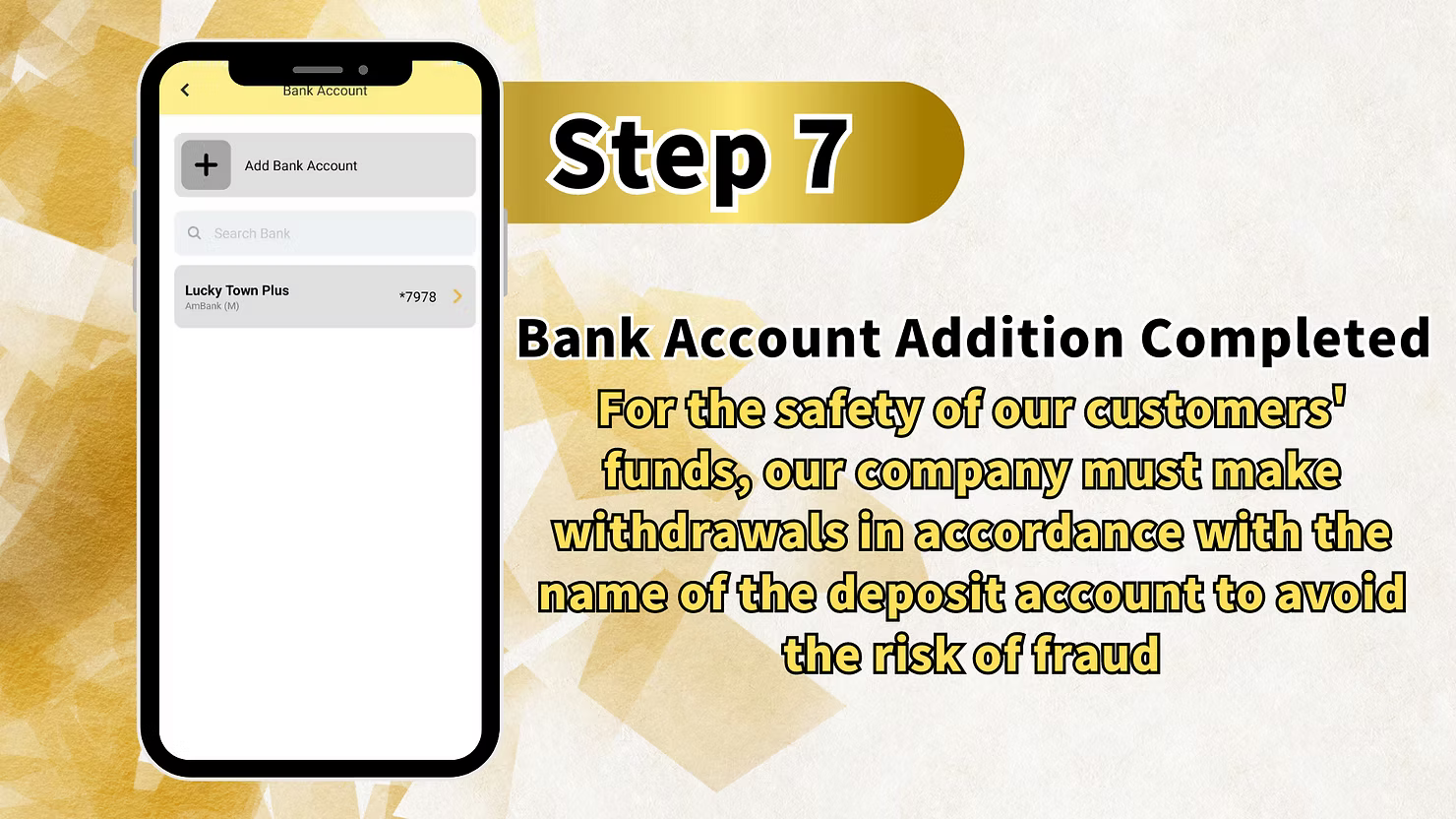
Bank Account Addition Completed on LUCKYTOWNPLUS
Success Confirmation on LUCKYTOWNPLUS
After the transaction PIN is accepted, LUCKYTOWNPLUS will confirm that your bank account has been successfully added.
Completion Message on LUCKYTOWNPLUS
You may see the message "Bank Account Addition Completed" once the process is finished.
Important Security Notice on LUCKYTOWNPLUS
For the safety of member funds, LUCKYTOWNPLUS processes withdrawals according to verified account information. This helps reduce fraud risk and ensures withdrawals are sent only to approved accounts.
Important Notes for Adding Bank Accounts on LUCKYTOWNPLUS
Name Matching on LUCKYTOWNPLUS
Your bank account name should match the verified name on your LUCKYTOWNPLUS account. Name mismatches may cause withdrawal delays or rejection.
Supported Banks on LUCKYTOWNPLUS
LUCKYTOWNPLUS supports a wide range of Malaysian banks. If your preferred bank is not visible, check the bank list again or contact support for guidance.
Transaction PIN Security on LUCKYTOWNPLUS
Your transaction PIN protects your account from unauthorized activity. Do not share it with anyone, and use the official LUCKYTOWNPLUS app screen only when entering your PIN.
Multiple Bank Accounts on LUCKYTOWNPLUS
Depending on your account options, you may be able to manage more than one bank account. Always make sure each account belongs to you and matches your verified details.
Frequently Asked Questions About Adding Bank Accounts on LUCKYTOWNPLUS
Why Do I Need to Add a Bank Account on LUCKYTOWNPLUS?
You need to add a bank account so LUCKYTOWNPLUS can process withdrawals securely to an account connected to your verified profile.
How Many Bank Accounts Can I Add on LUCKYTOWNPLUS?
The number of accounts you can add may depend on your LUCKYTOWNPLUS account settings. Check the Bank Account section for available options.
What If I Forgot My Transaction PIN on LUCKYTOWNPLUS?
Use the "Forgot transaction pin" link on the PIN entry screen to start the secure recovery process.
Can I Add a Joint Bank Account on LUCKYTOWNPLUS?
LUCKYTOWNPLUS withdrawals should use a bank account that matches your verified account name. Joint accounts may require additional checking or may not be accepted depending on verification requirements.
What If My Bank Isn't Listed on LUCKYTOWNPLUS?
If your bank is not listed, contact LUCKYTOWNPLUS support to confirm availability or ask about alternative withdrawal options.
How Do I Know My Bank Account Was Added on LUCKYTOWNPLUS?
LUCKYTOWNPLUS will show a confirmation message after your transaction PIN is accepted and the bank account setup is complete.
Is It Safe to Add My Bank Account on LUCKYTOWNPLUS?
Yes. Adding a bank account through the official LUCKYTOWNPLUS account page helps protect withdrawals and ensures funds are sent to verified account details.
Why Add a Bank Account on LUCKYTOWNPLUS?
Adding your bank account makes withdrawals smoother, safer, and faster. It gives LUCKYTOWNPLUS the verified payout details needed to process your funds correctly and helps protect your account from unauthorized withdrawal activity.
Add Your Bank Account on LUCKYTOWNPLUS Today
Ready to set up withdrawals? Add your bank account on LUCKYTOWNPLUS now and enjoy a secure withdrawal experience whenever you are ready to cash out.
Add Bank Account Now on LUCKYTOWNPLUS